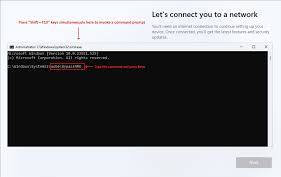
There is nothing more frustrating than the issue of OOBE bypassnro not working on the Windows 11 initial setup after installing the OS. No worries. Go to troubleshoot this issue step by step by following the comprehensive guide given by MiniTool.
Reader Comments
IWPD_1247(hadafaf)
June 17, 2025 4:21 AM
Good
Ahmad Zia
May 07, 2025 11:41 PM
Thanks this helped me.
Leave a comment
What Our Clients Say
Trusted by businesses and organizations across Afghanistan
Mohammad H.
Mohammad Hospital
"Hadaf ICT handled the complete network installation for our hospital. Everything works flawlessly, from wired connections to secure wireless access. Their team was professional and efficient."
Government Ministry
Biometric Attendance Application
"Hadaf ICT developed our biometric attendance system, which has significantly improved attendance tracking across multiple departments. The app is reliable and user-friendly."
Javid Ahmad Ahadi
Yark Burger & Pizza
"Hadaf ICT provided reliable domain registration and hosting services for our restaurant. The website setup was smooth, and their support team is always ready to help."
Limited Time Offer
Ready to Transform Your Business?
Join 500+ successful Afghan businesses that have accelerated their growth with our cutting-edge technology solutions.
Get started today with a free consultation!